> ## Documentation Index
> Fetch the complete documentation index at: https://hoopdev-fix-add-missing-mechanic-for-session-download-button.mintlify.site/llms.txt
> Use this file to discover all available pages before exploring further.
# Jira
> Automate change management and security workflows by integrating Jira with your infrastructure access requests.
 Hoop.dev's Jira integration transforms infrastructure access requests into automated Jira workflows, streamlining change management and security processes for your organization.
## Key Features
### Automated Change Management
* Automatically create and track Jira tickets for every infrastructure access request
* Maintain compliance with audit-ready change management records
* Reduce manual documentation and administrative overhead
### Seamless Workflow Integration
* Link access requests directly to Jira projects and request types
* Append contextual information from Hoop.dev sessions to Jira issues
* Support for custom and preset field mappings
### Flexible User Prompts & Data Collection
* Request additional information from users during access workflows
* Map manual or automated data to Jira fields for richer tickets
### CMDB & Asset Management Support
* Relate access requests to Configuration Management Database (CMDB) objects
* Automate asset linking and enforce asset-based workflows (requires Jira Assets)
## Benefits
* **Compliance:** Ensure every access request is tracked and auditable
* **Efficiency:** Eliminate manual ticket creation and reduce operational friction
* **Security:** Keep security and development teams in sync with real-time updates
* **Visibility:** Gain a complete audit trail of access and change events
## Integration with Other Features
Jira integration works seamlessly with other Hoop.dev features:
* **Guardrails:** Enforce policy and track exceptions via Jira
* **Session Recording:** Link session logs to Jira tickets for full traceability
* **Access Control:** Automate approvals and reviews through Jira workflows
## Configuration
To get started, enable the Jira integration in the Integrations section of your Hoop.dev instance.\
For a step-by-step setup and advanced options, see [Advanced Configuration](#advanced-configuration).
***
## Advanced Configuration
### Prerequisites
* A Hoop.dev account (managed or self-hosted)
* Administrator access in both Hoop.dev and Jira Cloud
### Quickstart
In the Integrations section (on the main sidebar), go to Jira and enable the integration to configure your credentials.
Hoop.dev's Jira integration transforms infrastructure access requests into automated Jira workflows, streamlining change management and security processes for your organization.
## Key Features
### Automated Change Management
* Automatically create and track Jira tickets for every infrastructure access request
* Maintain compliance with audit-ready change management records
* Reduce manual documentation and administrative overhead
### Seamless Workflow Integration
* Link access requests directly to Jira projects and request types
* Append contextual information from Hoop.dev sessions to Jira issues
* Support for custom and preset field mappings
### Flexible User Prompts & Data Collection
* Request additional information from users during access workflows
* Map manual or automated data to Jira fields for richer tickets
### CMDB & Asset Management Support
* Relate access requests to Configuration Management Database (CMDB) objects
* Automate asset linking and enforce asset-based workflows (requires Jira Assets)
## Benefits
* **Compliance:** Ensure every access request is tracked and auditable
* **Efficiency:** Eliminate manual ticket creation and reduce operational friction
* **Security:** Keep security and development teams in sync with real-time updates
* **Visibility:** Gain a complete audit trail of access and change events
## Integration with Other Features
Jira integration works seamlessly with other Hoop.dev features:
* **Guardrails:** Enforce policy and track exceptions via Jira
* **Session Recording:** Link session logs to Jira tickets for full traceability
* **Access Control:** Automate approvals and reviews through Jira workflows
## Configuration
To get started, enable the Jira integration in the Integrations section of your Hoop.dev instance.\
For a step-by-step setup and advanced options, see [Advanced Configuration](#advanced-configuration).
***
## Advanced Configuration
### Prerequisites
* A Hoop.dev account (managed or self-hosted)
* Administrator access in both Hoop.dev and Jira Cloud
### Quickstart
In the Integrations section (on the main sidebar), go to Jira and enable the integration to configure your credentials.
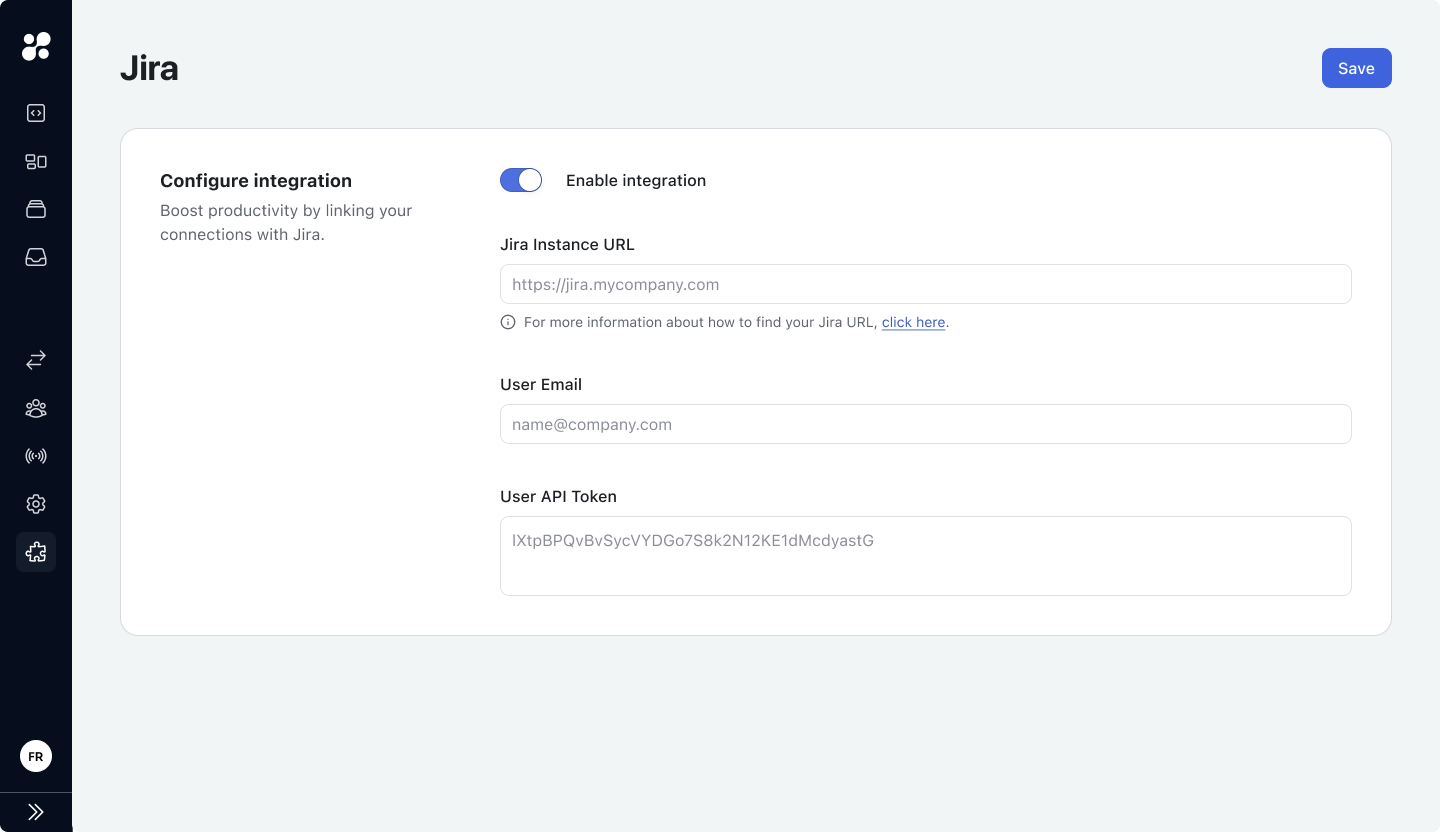 For more information about these fields check [Jira Integration](#jira-integration) fields.
With Jira Integrations enabled, your organization has access to Jira Templates on the main sidebar.
For more information about these fields check [Jira Integration](#jira-integration) fields.
With Jira Integrations enabled, your organization has access to Jira Templates on the main sidebar.
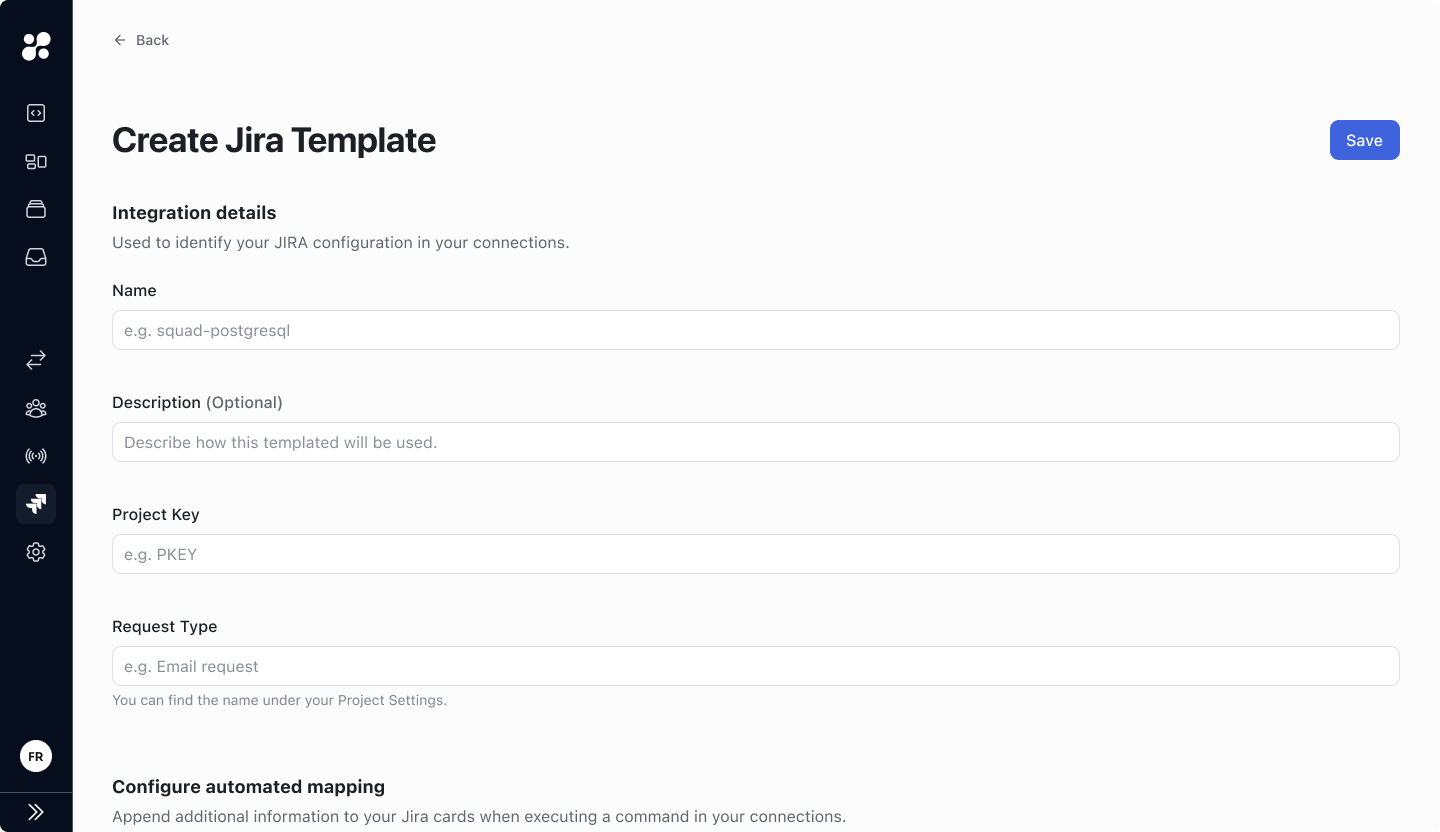 To create a Jira Template, fill out the following information:
* **Integration details:** Name, Description, Project Key, and Request Type.
For more information about how to get Jira information check [Jira Templates](#jira-templates).
* **Automated Mapping:** Append additional information to created Jira tickets when executing commands in a connection.
For more information about available hoop.dev fields, check [Automated Mapping](#automated-mapping).
* **Manual Prompt:** Request additional information from users when executing commands to be appended to created Jira tickets.
For more information, check [Manual Prompt](#manual-prompt).
* **Configuration Management Database (CMDB):** Optionally relate CMDBs and hoop.dev services.
To create a Jira Template, fill out the following information:
* **Integration details:** Name, Description, Project Key, and Request Type.
For more information about how to get Jira information check [Jira Templates](#jira-templates).
* **Automated Mapping:** Append additional information to created Jira tickets when executing commands in a connection.
For more information about available hoop.dev fields, check [Automated Mapping](#automated-mapping).
* **Manual Prompt:** Request additional information from users when executing commands to be appended to created Jira tickets.
For more information, check [Manual Prompt](#manual-prompt).
* **Configuration Management Database (CMDB):** Optionally relate CMDBs and hoop.dev services.
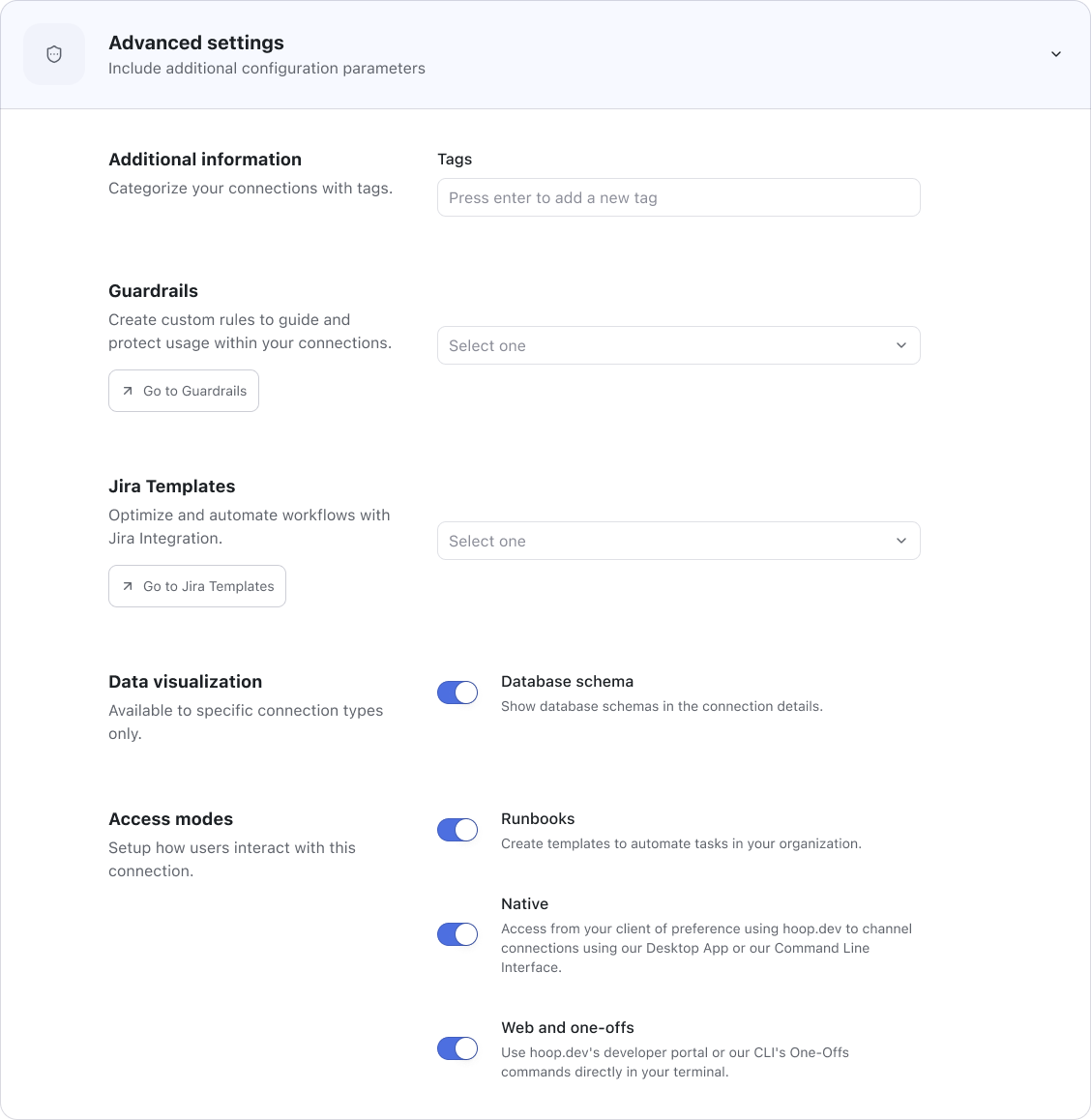 While creating or configuring a connection, navigate to
 Advanced Settings and select a Jira Template.
To keep your default workflow, Review option must be enabled for this connection. Connections without Review enabled will mark Jira tickets as done after executing a command.
When a command is executed in a connection with a Jira Template, all configured information is checked (and requested, if needed) and appended to the session while a Jira ticket is created to the workflow.
***
### Jira Integration Fields
#### Jira Instance URL
**url** (`string`)\
Check [How to find your Jira URL](https://confluence.atlassian.com/jirakb/how-to-find-your-site-url-to-set-up-the-jira-data-center-and-server-mobile-app-954244798.html).
#### User Email
**email** (`string`)\
User email of Jira account to be connected with hoop.dev services.\
To ensure compatibility we recommend using a Jira admin account.
#### User API Token
**apiToken** (`string`)\
Go to Atlassian Account > Security > API Tokens or access [API Tokens](https://id.atlassian.com/manage-profile/security/api-tokens) to manage your API Tokens.
***
### Jira Templates
#### Project Key
**projectKey** (`string`)\
The ID or key of the Jira project.
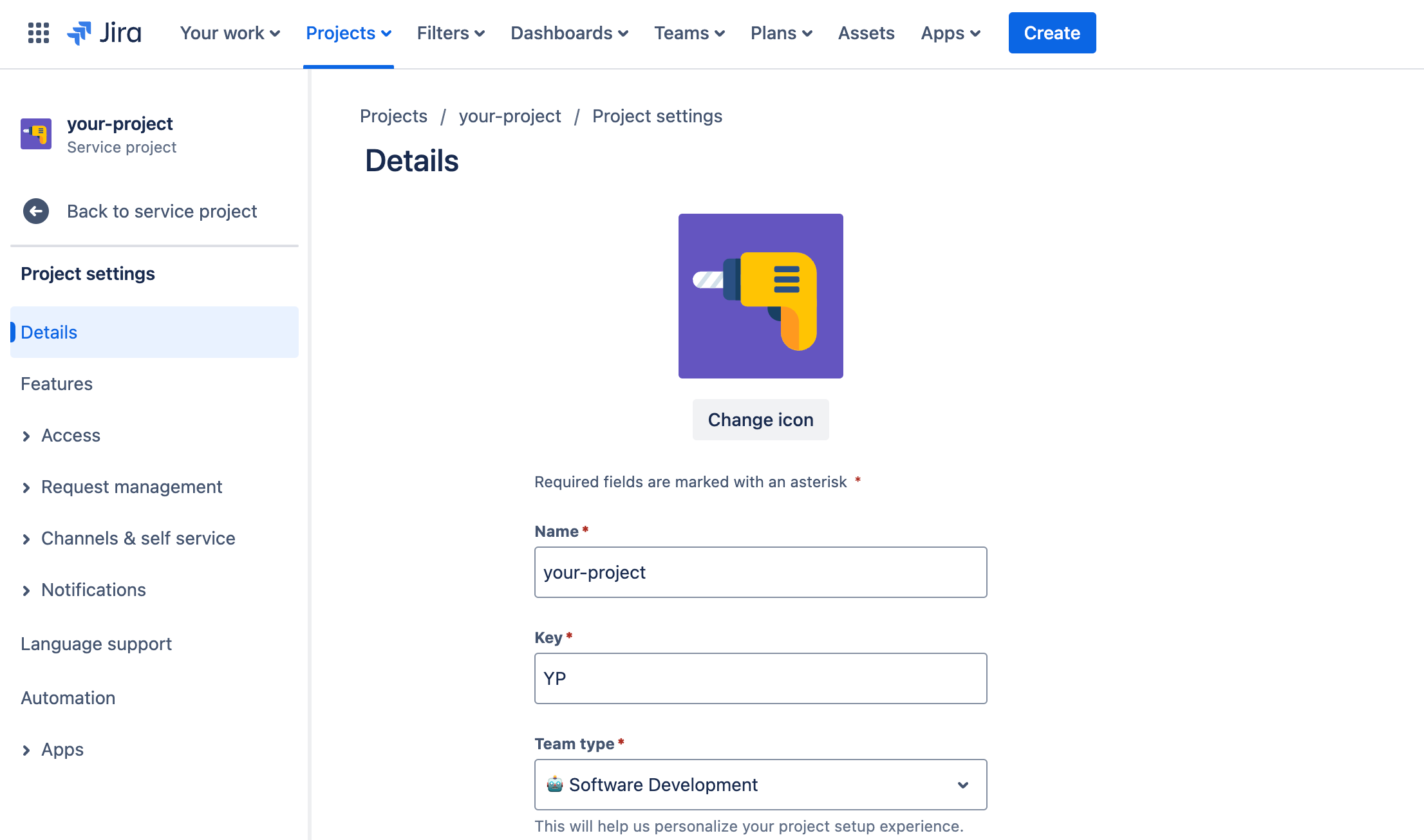 This field is case sensitive, make sure you have the right information.
#### Request Type
**requestTypeId** (`string`)\
The ID of the customer request type.
This field is case sensitive, make sure you have the right information.
#### Request Type
**requestTypeId** (`string`)\
The ID of the customer request type.
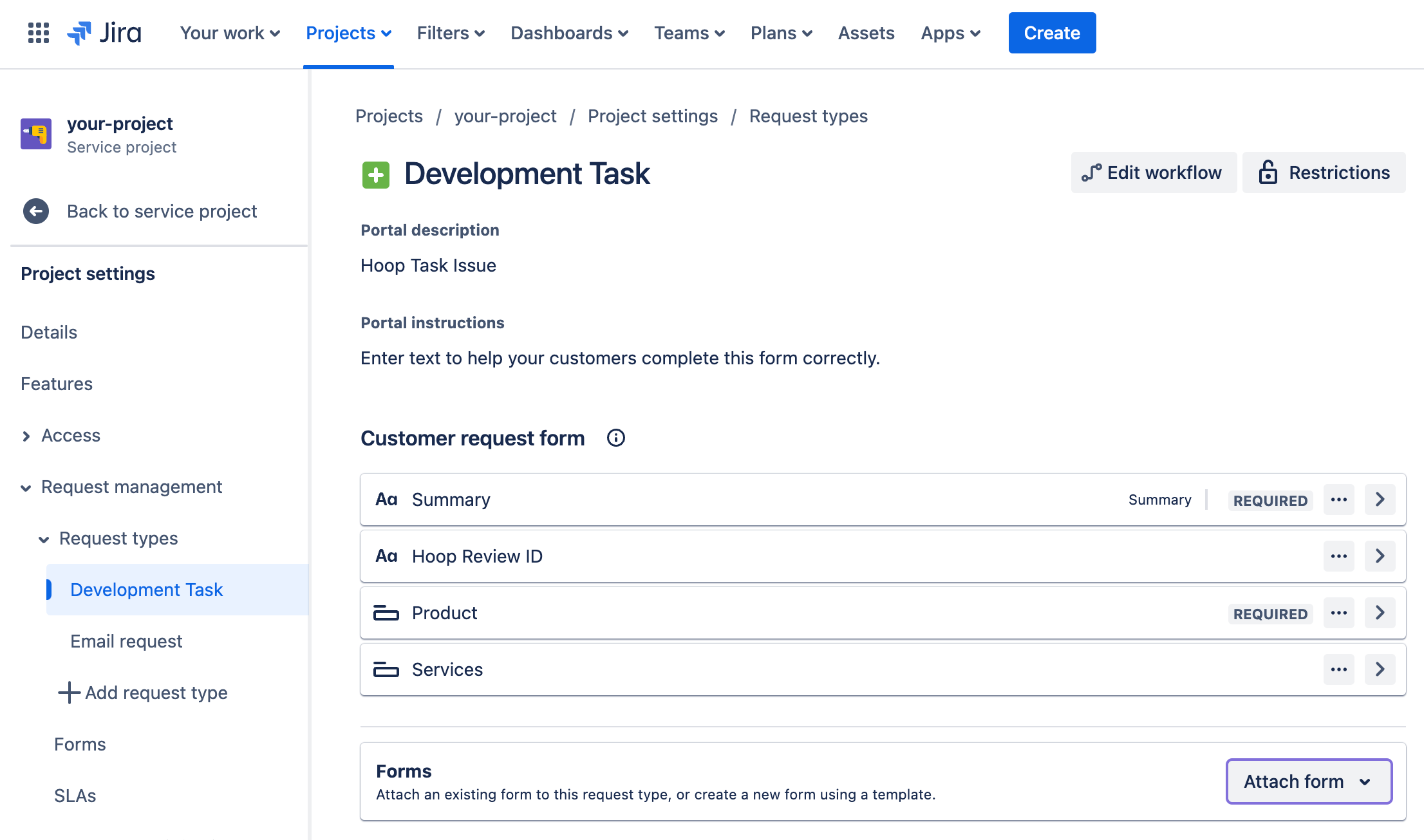 ```sh theme={null}
# the ID is included at the end of the URL
# 10005: requestTypeId
https://yourcompany.atlassian.net/jira/servicedesk/projects/PROJ/settings/issuetypes/10005
```
This field is case sensitive, make sure you have the right information.
***
### Automated Mapping
Appends additional information to Jira cards when executing commands in a connection.
| Field | Values | Usage |
| --------------- | -------- | ------------------------------------------------------- |
| **Type** | Preset | Relates hoop.dev fields with Jira fields. |
| | Custom | Appends a custom key-value relation to Jira cards. |
| **Jira Field** | `string` | Jira key used to store appended value (case sensitive). |
| **Value** | `string` | Value related to Jira field key. |
| **Description** | `string` | Optional information used to identify a mapping item. |
**Preset values include:**\
Session ID, User Email, User ID, User Name, Connection Type, Connection Name, Connection Tags, Session Status, Session Start Date, Session Type, Session Script
***
### Manual Prompt
Requests manual input from users to get additional information when executing commands in a connection.
| Field | Values | Usage |
| --------------- | --------- | ------------------------------------------------------------------------- |
| **Label** | `string` | Text input label presented for users. |
| **Jira Field** | `string` | Jira key used to store appended value (case sensitive). |
| **Description** | `string` | Optional information used to identify a mapping item. |
| **Required** | `boolean` | Define if the input information is required before executing the command. |
***
### Configuration Management Database (CMDB)
Automates an advanced relation between CMDB files and hoop services.\
If information is not matched with CMDB, required information will be requested to be manually filled by the user before executing the command.
| Field | Values | Usage |
| --------------- | --------- | ------------------------------------------------------------------------- |
| **Label** | `string` | Text input label presented for users. |
| **Jira Field** | `string` | Jira key used to store appended value (case sensitive). |
| **Value** | `string` | Value related to Jira field key. |
| **Object Type** | `string` | An object type represents a group of similar objects. |
| **Description** | `string` | Optional information used to identify a mapping item. |
| **Required** | `boolean` | Define if the input information is required before executing the command. |
Learn more about [Object Types](https://support.atlassian.com/jira-service-management-cloud/docs/what-are-object-types/)
#### CMDB Configuration
To manage your custom CMDB fields, check [Jira Service Management Support](https://support.atlassian.com/jira-service-management-cloud/docs/set-up-the-assets-object-field/).\
An Enterprise or Premium account is needed in order to get Jira Assets.
***
### API Permissions
Jira integration endpoints. If using a token with a more specific scope, ensure you have access to these endpoints.
#### Jira Instance API Permissions
**POST**
```sh theme={null}
https://yourinstance.atlassian.net/rest/servicedeskapi/request
```
**GET**
```sh theme={null}
https://yourinstance.atlassian.net/rest/api/3/issue/{issueKey}/transitions
```
**POST**
```sh theme={null}
https://yourinstance.atlassian.net/rest/api/3/issue/{issueKey}/transitions
```
#### Assets API Permissions
**GET**
```sh theme={null}
https://api.atlassian.com/jsm/assets/workspace/{workspaceId}/v1/object/aql
```
**GET**
```sh theme={null}
https://yourinstance.atassian.net/rest/servicedeskapi/assets/workspace
```
***
### Troubleshooting
Common issues and their solutions:
* **Token Issues:** Ensure your API token has the correct permissions
* **Service Desk ID/Project Key Errors:** Check numbers or case sensitivity and verify if the project exists
* **Request Type Mismatches:** Confirm the exact request type name in Jira settings
```sh theme={null}
# the ID is included at the end of the URL
# 10005: requestTypeId
https://yourcompany.atlassian.net/jira/servicedesk/projects/PROJ/settings/issuetypes/10005
```
This field is case sensitive, make sure you have the right information.
***
### Automated Mapping
Appends additional information to Jira cards when executing commands in a connection.
| Field | Values | Usage |
| --------------- | -------- | ------------------------------------------------------- |
| **Type** | Preset | Relates hoop.dev fields with Jira fields. |
| | Custom | Appends a custom key-value relation to Jira cards. |
| **Jira Field** | `string` | Jira key used to store appended value (case sensitive). |
| **Value** | `string` | Value related to Jira field key. |
| **Description** | `string` | Optional information used to identify a mapping item. |
**Preset values include:**\
Session ID, User Email, User ID, User Name, Connection Type, Connection Name, Connection Tags, Session Status, Session Start Date, Session Type, Session Script
***
### Manual Prompt
Requests manual input from users to get additional information when executing commands in a connection.
| Field | Values | Usage |
| --------------- | --------- | ------------------------------------------------------------------------- |
| **Label** | `string` | Text input label presented for users. |
| **Jira Field** | `string` | Jira key used to store appended value (case sensitive). |
| **Description** | `string` | Optional information used to identify a mapping item. |
| **Required** | `boolean` | Define if the input information is required before executing the command. |
***
### Configuration Management Database (CMDB)
Automates an advanced relation between CMDB files and hoop services.\
If information is not matched with CMDB, required information will be requested to be manually filled by the user before executing the command.
| Field | Values | Usage |
| --------------- | --------- | ------------------------------------------------------------------------- |
| **Label** | `string` | Text input label presented for users. |
| **Jira Field** | `string` | Jira key used to store appended value (case sensitive). |
| **Value** | `string` | Value related to Jira field key. |
| **Object Type** | `string` | An object type represents a group of similar objects. |
| **Description** | `string` | Optional information used to identify a mapping item. |
| **Required** | `boolean` | Define if the input information is required before executing the command. |
Learn more about [Object Types](https://support.atlassian.com/jira-service-management-cloud/docs/what-are-object-types/)
#### CMDB Configuration
To manage your custom CMDB fields, check [Jira Service Management Support](https://support.atlassian.com/jira-service-management-cloud/docs/set-up-the-assets-object-field/).\
An Enterprise or Premium account is needed in order to get Jira Assets.
***
### API Permissions
Jira integration endpoints. If using a token with a more specific scope, ensure you have access to these endpoints.
#### Jira Instance API Permissions
**POST**
```sh theme={null}
https://yourinstance.atlassian.net/rest/servicedeskapi/request
```
**GET**
```sh theme={null}
https://yourinstance.atlassian.net/rest/api/3/issue/{issueKey}/transitions
```
**POST**
```sh theme={null}
https://yourinstance.atlassian.net/rest/api/3/issue/{issueKey}/transitions
```
#### Assets API Permissions
**GET**
```sh theme={null}
https://api.atlassian.com/jsm/assets/workspace/{workspaceId}/v1/object/aql
```
**GET**
```sh theme={null}
https://yourinstance.atassian.net/rest/servicedeskapi/assets/workspace
```
***
### Troubleshooting
Common issues and their solutions:
* **Token Issues:** Ensure your API token has the correct permissions
* **Service Desk ID/Project Key Errors:** Check numbers or case sensitivity and verify if the project exists
* **Request Type Mismatches:** Confirm the exact request type name in Jira settings