> ## Documentation Index
> Fetch the complete documentation index at: https://hoopdev-fix-add-missing-mechanic-for-session-download-button.mintlify.site/llms.txt
> Use this file to discover all available pages before exploring further.
# Webhooks/SIEM
> Activate and use webhooks and SIEM integrations.
 ## Prerequisites
* Finish [integration with Svix](/integrations/svix);
* [Hoop.dev's CLI](/clients/cli) installed in your local machine;
* Be an admin at your Hoop.dev instance
* Be in an Enterprise Plan
## Configuring
To configure Hoop to send events to your SIEM, log in with the client and create the `webhooks` plugin.
```bash theme={null}
hoop login
```
```bash theme={null}
hoop admin create plugin webhooks
```
After enabling it, you need to select which connections you want to emit webhook events. Let's override the plugin and enable it for an existing connection.
```bash theme={null}
hoop admin create plugin webhooks --overwrite --connection bash-default
```
## Dashboard
Now, you can log in to your dashboard and start configuring endpoints while selecting the messages you want to subscribe to.
```bash theme={null}
hoop admin webhooks-dashboard
```
Dashboard is only available when using Svix SaaS and could be only opened by administrators.
To view any activity, interact with any connection.
```bash theme={null}
hoop connect bash-default
```
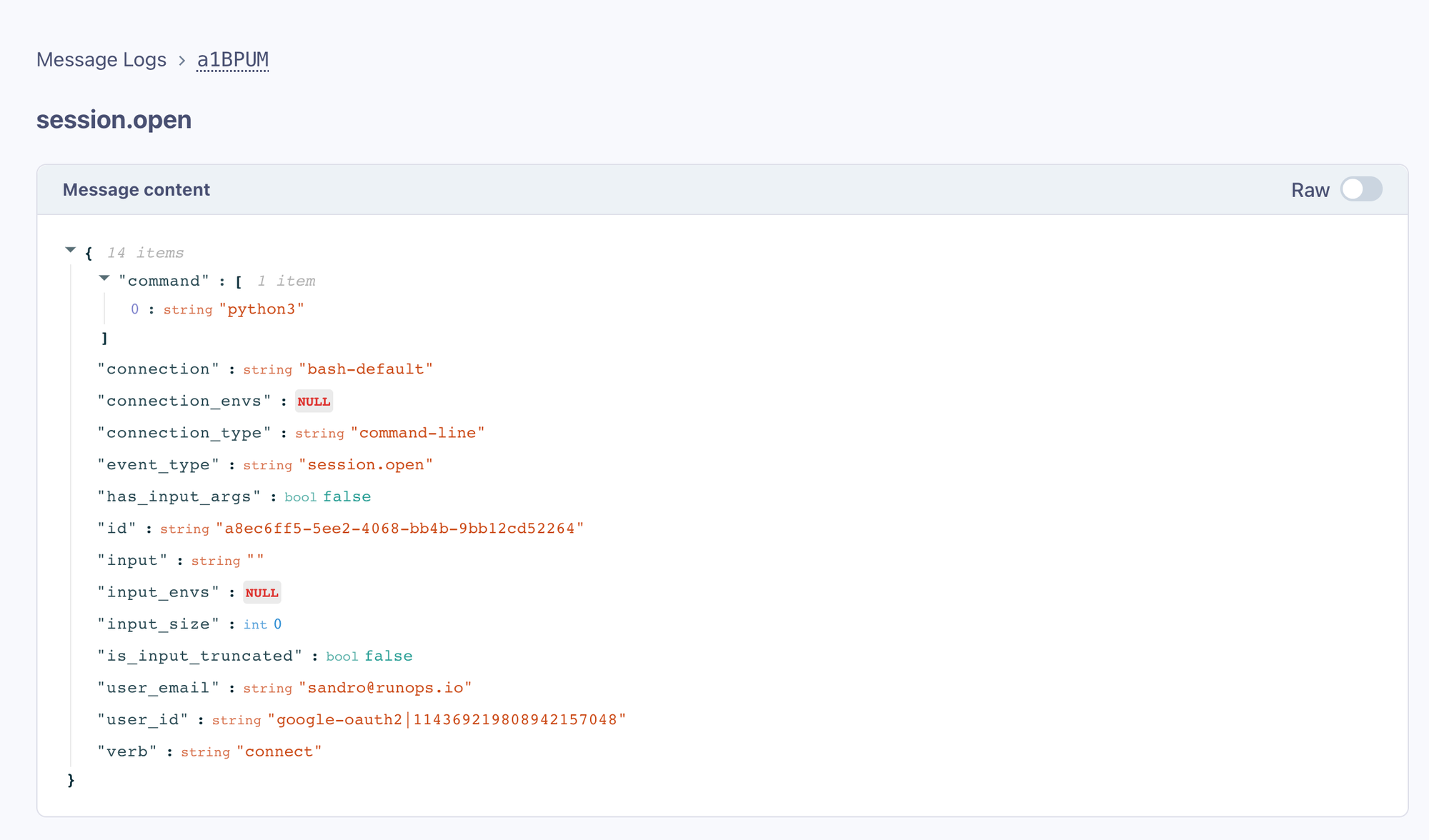
Accessing the **Message Logs** link in the dashboard will display the `hoop connect` event.
## Prerequisites
* Finish [integration with Svix](/integrations/svix);
* [Hoop.dev's CLI](/clients/cli) installed in your local machine;
* Be an admin at your Hoop.dev instance
* Be in an Enterprise Plan
## Configuring
To configure Hoop to send events to your SIEM, log in with the client and create the `webhooks` plugin.
```bash theme={null}
hoop login
```
```bash theme={null}
hoop admin create plugin webhooks
```
After enabling it, you need to select which connections you want to emit webhook events. Let's override the plugin and enable it for an existing connection.
```bash theme={null}
hoop admin create plugin webhooks --overwrite --connection bash-default
```
## Dashboard
Now, you can log in to your dashboard and start configuring endpoints while selecting the messages you want to subscribe to.
```bash theme={null}
hoop admin webhooks-dashboard
```
Dashboard is only available when using Svix SaaS and could be only opened by administrators.
To view any activity, interact with any connection.
```bash theme={null}
hoop connect bash-default
```
Accessing the **Message Logs** link in the dashboard will display the `hoop connect` event.
 ### Adding Endpoints
To route these messages to your SIEM, add your public endpoint that will receive these messages. Click on the **Endpoints** link.
Adding endpoints to a self-hosted Svix instance is only available via [svix command line](https://docs.svix.com/tutorials/cli) or api.
### Adding Endpoints
To route these messages to your SIEM, add your public endpoint that will receive these messages. Click on the **Endpoints** link.
Adding endpoints to a self-hosted Svix instance is only available via [svix command line](https://docs.svix.com/tutorials/cli) or api.
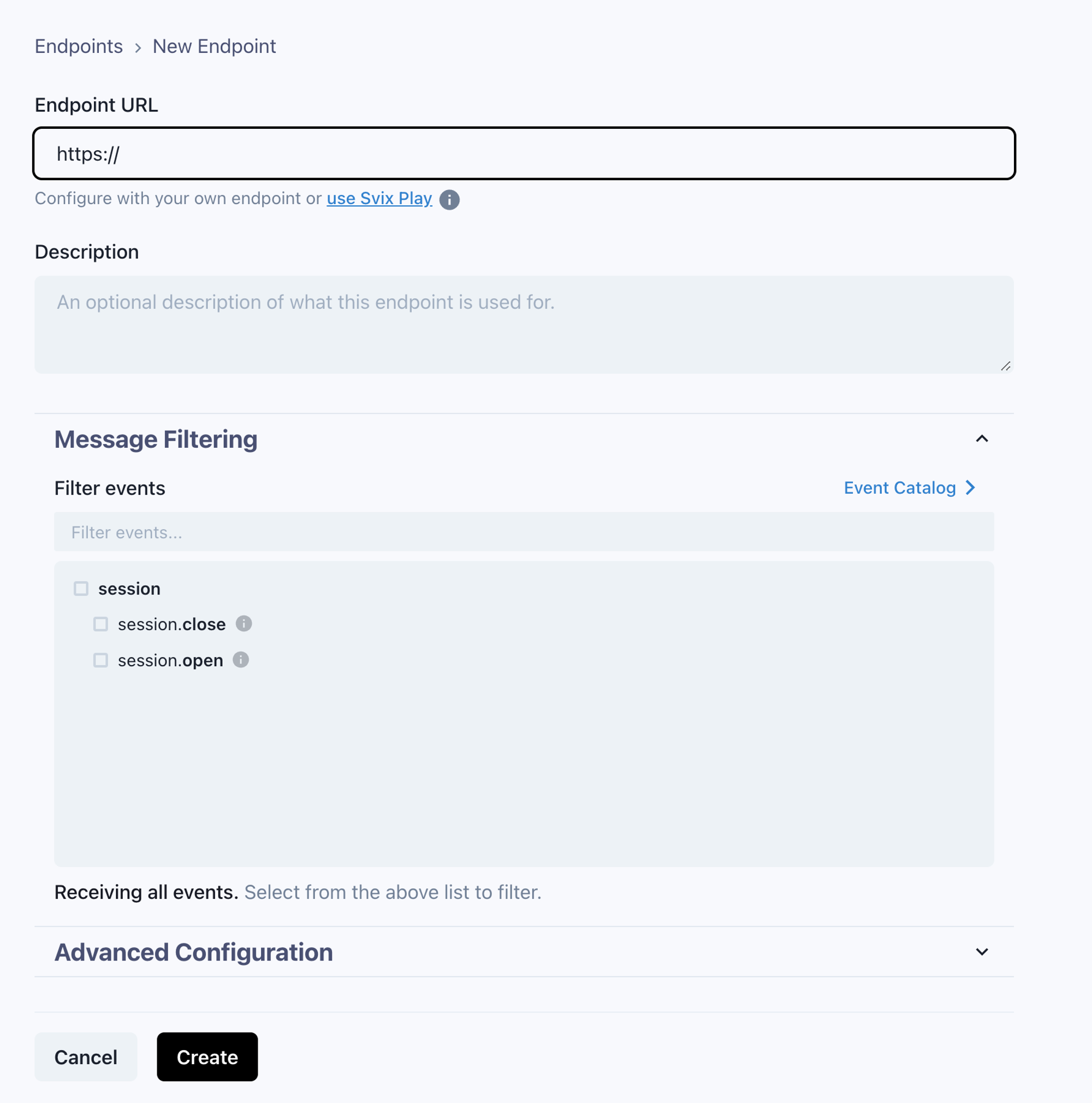 You can use [Svix Play](https://play.svix.com/) to test it first.
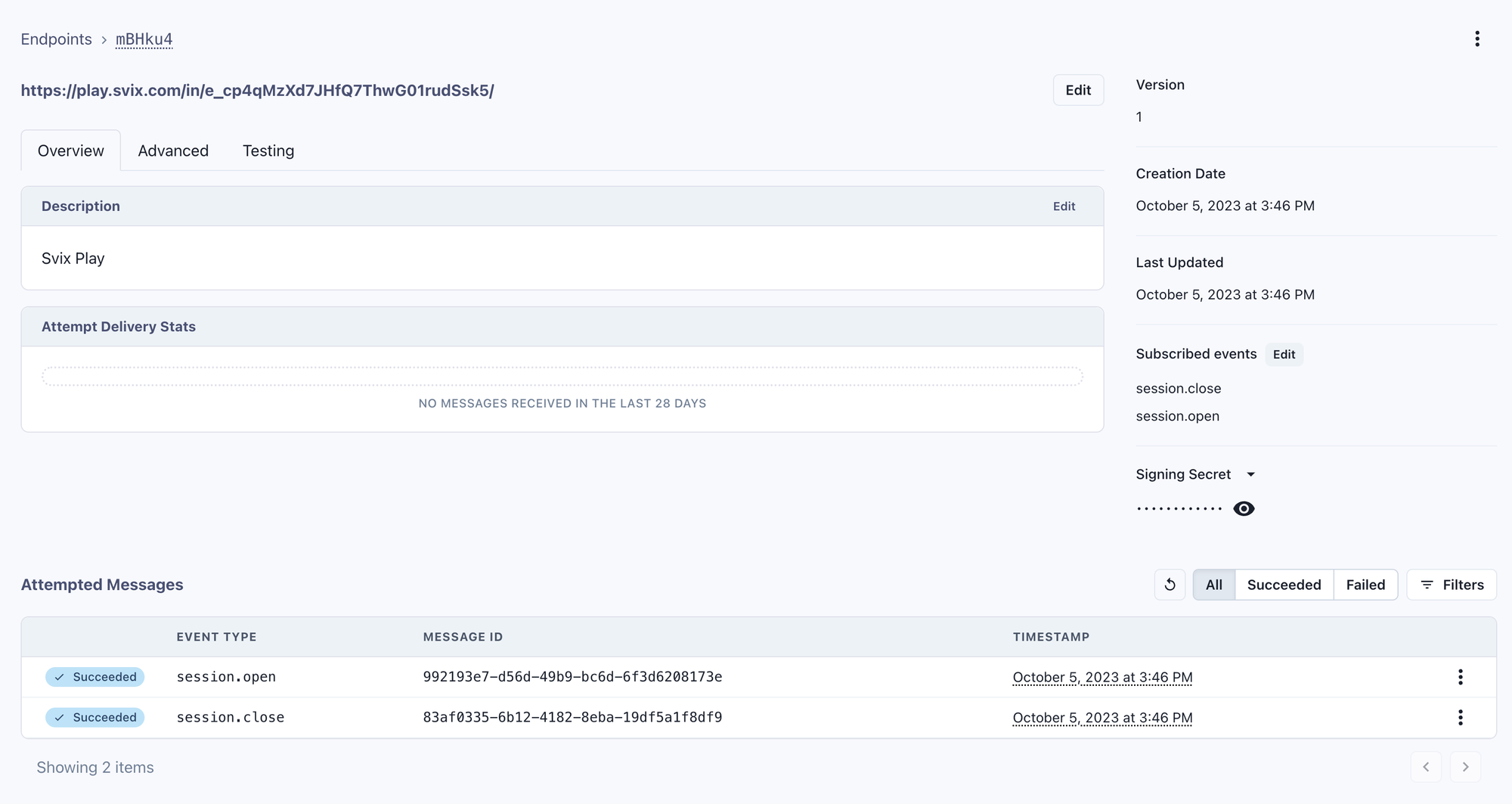
Accessing the endpoint will contain the messages that have been sent to it.
You can use [Svix Play](https://play.svix.com/) to test it first.
Accessing the endpoint will contain the messages that have been sent to it.
 ### Event Types
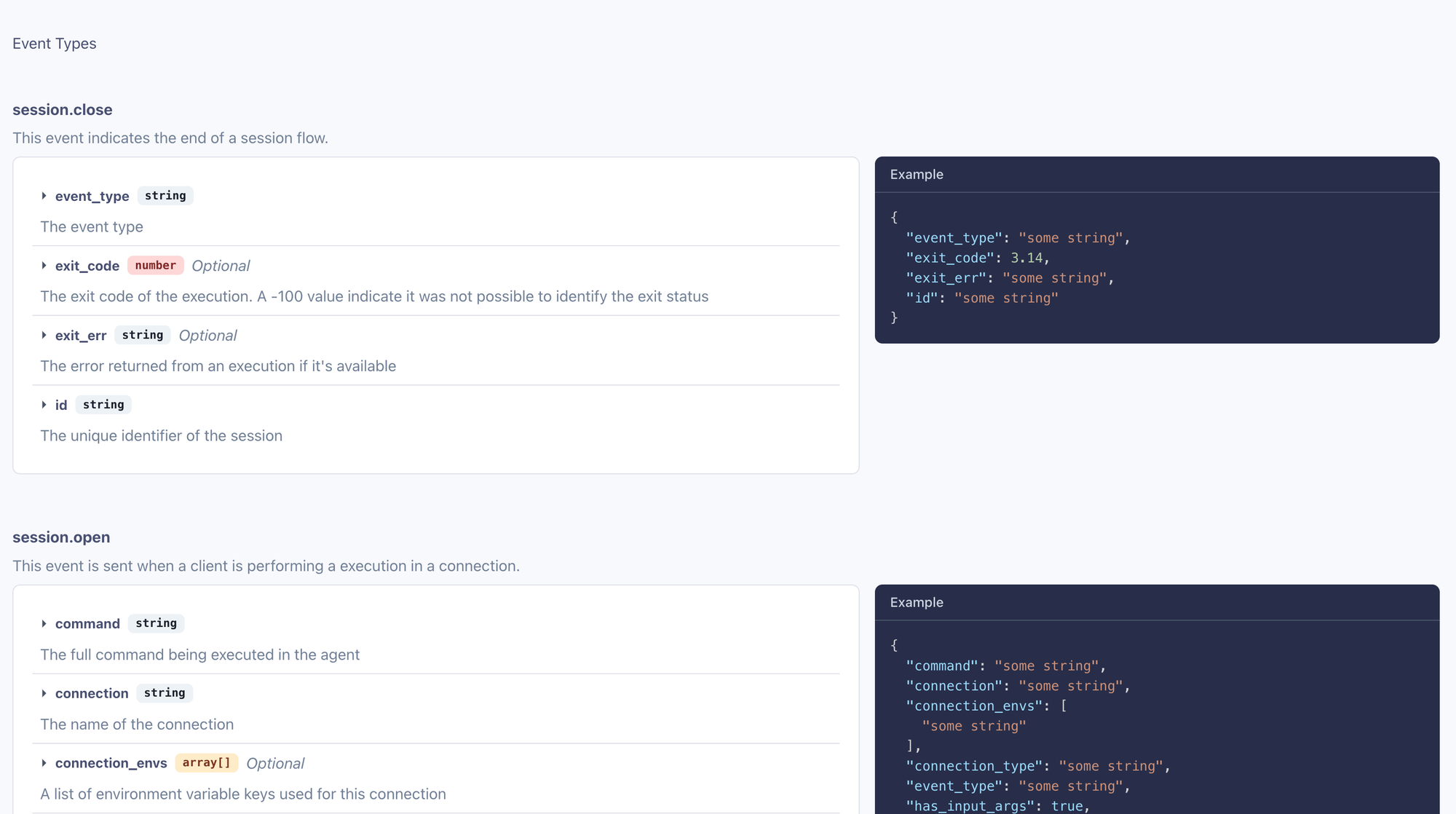
Hoop provides the definition of each event that is sent. To access these definitions, refer to the **Event Catalog** link.
### Event Types
Hoop provides the definition of each event that is sent. To access these definitions, refer to the **Event Catalog** link.
 ## Consuming Webhooks
As Svix serves as our webhook service provider, it's recommended to refer to their [documentation](https://docs.svix.com/receiving/introduction) for guidelines and best practices for the secure verification and consumption of webhooks.
## Svix Self Hosted
For self-hosted installations, you must interact directly with Svix using either the Svix CLI or the API.
For your convenience, we offer experimental endpoints that allow you to manage Svix's main resources.
The Hoop command line tool integrates with these resources to provide proper Svix management capabilities.
### Event Types
Hoop may send the following events depending how users are interacting with the system
| Event Name | Description |
| ----------------------------- | -------------------------------------------------------------------------------- |
| dbroles.job.finished | Run when the provisioning of a database user role finishes (aws connect feature) |
| microsoftteams.review\.create | Run when a review is created |
| session.open | Run when a session is open and / or review created |
| session.close | Run when a session finishes |
Event types can be configured to route specific events to designated endpoints.
To manage event types in a self-hosted installation, use the following command line syntax to create them:
```sh theme={null}
hoop admin create svixeventtype session.open --description 'Is sent when a session or review is created'
hoop admin create svixeventtype session.close --description 'Is sent when a session finishes'
hoop admin create svixeventtype dbroles.job.finished --description 'Is when the provisioning of a database user role finishes'
```
### Endpoints
Endpoints allow to configure how to receive webhook messages.
```sh theme={null}
hoop admin create svixendpoint --description 'My main endpoint' --url https://play.svix.com/in/e_f1q1l3Dk8HzjA2bcWA7E6CeyMuL/
```
The example below will only send messages `session.open` and `session.close` event types.
The `--overwrite` will update an endpoint
```sh theme={null}
hoop admin create svixendpoint ep_ \
--overwrite \
--filters session.open,session.close \
--description 'My main endpoint' \
--url https://play.svix.com/in/e_f1q1l3Dk8HzjA2bcWA7E6CeyMuL/
```
To list the endpoints and usage statistics about each endpoint:
```sh theme={null}
hoop admin get svixendpoint
```
```
ID DESCRIPTION DISABLED VERSION FAIL PENDING SENDING SUCCESS FILTERS AGE
ep_2vY7... My main endpoint false 1 0 0 0 3 session.open 46m ago
```
### Messages
To list message delivery attempts and troubleshoot webhook transmission issues, use the command below:
```sh theme={null}
hoop admin get svixmsg
```
```
ID ATTEMPTID TRIGGER STATUS STATUSCODE AGE
msg_2vY... atmpt_2vY7... scheduled success 204 45m ago
msg_2vY... atmpt_2vY7... scheduled success 204 46m ago
msg_2vY... atmpt_2vY7... scheduled success 204 46m ago
```
In case of multiple endpoints the `endpoint_id` query string is required
```sh theme={null}
hoop admin get svixmsg -q endpoint_id=ep_2vY... -q limit=100
```
## Consuming Webhooks
As Svix serves as our webhook service provider, it's recommended to refer to their [documentation](https://docs.svix.com/receiving/introduction) for guidelines and best practices for the secure verification and consumption of webhooks.
## Svix Self Hosted
For self-hosted installations, you must interact directly with Svix using either the Svix CLI or the API.
For your convenience, we offer experimental endpoints that allow you to manage Svix's main resources.
The Hoop command line tool integrates with these resources to provide proper Svix management capabilities.
### Event Types
Hoop may send the following events depending how users are interacting with the system
| Event Name | Description |
| ----------------------------- | -------------------------------------------------------------------------------- |
| dbroles.job.finished | Run when the provisioning of a database user role finishes (aws connect feature) |
| microsoftteams.review\.create | Run when a review is created |
| session.open | Run when a session is open and / or review created |
| session.close | Run when a session finishes |
Event types can be configured to route specific events to designated endpoints.
To manage event types in a self-hosted installation, use the following command line syntax to create them:
```sh theme={null}
hoop admin create svixeventtype session.open --description 'Is sent when a session or review is created'
hoop admin create svixeventtype session.close --description 'Is sent when a session finishes'
hoop admin create svixeventtype dbroles.job.finished --description 'Is when the provisioning of a database user role finishes'
```
### Endpoints
Endpoints allow to configure how to receive webhook messages.
```sh theme={null}
hoop admin create svixendpoint --description 'My main endpoint' --url https://play.svix.com/in/e_f1q1l3Dk8HzjA2bcWA7E6CeyMuL/
```
The example below will only send messages `session.open` and `session.close` event types.
The `--overwrite` will update an endpoint
```sh theme={null}
hoop admin create svixendpoint ep_ \
--overwrite \
--filters session.open,session.close \
--description 'My main endpoint' \
--url https://play.svix.com/in/e_f1q1l3Dk8HzjA2bcWA7E6CeyMuL/
```
To list the endpoints and usage statistics about each endpoint:
```sh theme={null}
hoop admin get svixendpoint
```
```
ID DESCRIPTION DISABLED VERSION FAIL PENDING SENDING SUCCESS FILTERS AGE
ep_2vY7... My main endpoint false 1 0 0 0 3 session.open 46m ago
```
### Messages
To list message delivery attempts and troubleshoot webhook transmission issues, use the command below:
```sh theme={null}
hoop admin get svixmsg
```
```
ID ATTEMPTID TRIGGER STATUS STATUSCODE AGE
msg_2vY... atmpt_2vY7... scheduled success 204 45m ago
msg_2vY... atmpt_2vY7... scheduled success 204 46m ago
msg_2vY... atmpt_2vY7... scheduled success 204 46m ago
```
In case of multiple endpoints the `endpoint_id` query string is required
```sh theme={null}
hoop admin get svixmsg -q endpoint_id=ep_2vY... -q limit=100
```